Note
This page was generated from a Jupyter notebook. Not all interactive visualization will work on this web page. Consider downloading the notebooks for full Python-backed interactivity.
[ ]:
# holoviews initialization


1. Preface
1.1. about this document
Welcome to the main pipeline of minian! The purpose of this annotated version of the minian pipeline is to guide the user through each step of the code, working with a short demo movie. The intention is to enable the user to understand the code as much as possible so that they are equipped with the knowledge necessary to customize the code for their own needs, regardless of prior programming skills.
Before we start, it s highly recommended that you get familiar with basic python concepts and operations like string manipulation, tuples, lists and dictionaries, as well as a little bit about object-oriented programming and python modules.
1.2. text styling
Note on the styling of this document: most of the sentences should hopefully make sense if taken literally. However, some special formatting of the text is used to demonstrate the close relationship between the concepts discussed and the code, as well as encouraging the reader to understand the Python syntax. Specifically:
a hyperlink usually points to a well-defined python module, class or methods, especially when that concept is first encountered in this document. The link usually points to the official documentation of that concept, which in some cases might not be the best place to start for a beginner. If you find the documentation puzzling, try to google the concept in question and find a tutorial that best suits you.
an inline
codeusually refers to a name that already exsists in the namespace (i.e. the context where we run the codes in this document). It can be a previously encountered concept, but more often it referes to variable names or method names that we imported or have defined along the way.bold texts are used more loosely to highlight anything that requires more attention. Though they are not used as carefully as previous formats, they often refer to specific values that a variable or method arguments can assume.
Info boxes are used to provide hints and tips to help users run through this pipeline smoothly.
1.3. workflow
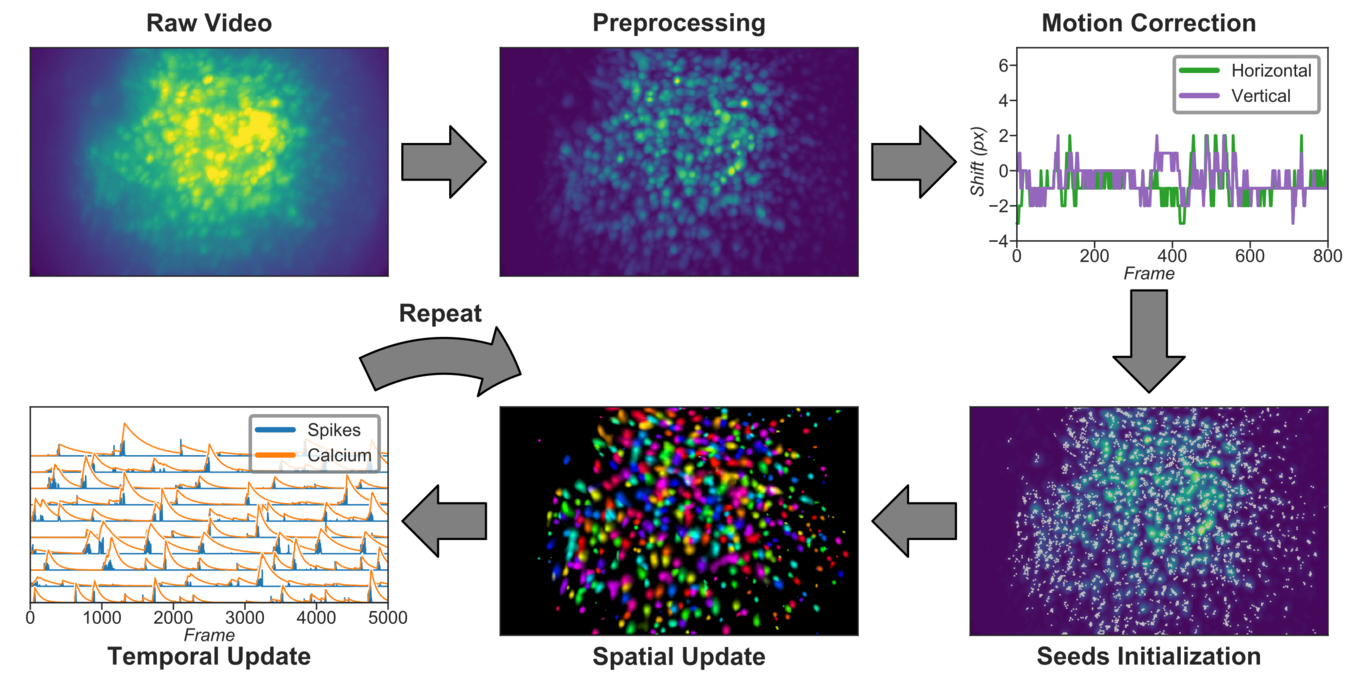
There are 5 main sections in this pipeline: Setting up, Pre-processing, Motion Correction, Initialization, and CNMF, which are composed of interative spatial update and temporal update.